About Me
Latest posts
Links
|
In today's tutorial, we will learn how to change the sizes of images in Blogger. Blogger's default options make all images really small, even when the image size setting is large. So we will learn how to make images bigger. Click Read More to view this whole post.
Okay, so how do we change the size of an image? Simply put, HTML. However, this tutorial is going to be easy enough so that even if you don't know HTML or even what it is, you can follow this.
1)Log into your Blogger account, as always. Go to Posting>Create or Edit Posts, depending if you want to add a new image or edit a old one. 2)Upload your image as usual. 3)Switch to Edit HTML. This way, we can see the under code. 4)Find your image. It should be relatively easy to find. It usually begins with <.img src but with no dot '.' of course!
5.Look at the code of your image. Drag your eyes through it until you see width and height. My image had width: 400px; height: 300px. From here, it should be pretty obvious, change the values (the 400 and 300 in my example) to anything you want!
Below is an example of an un-modified image, and a modified one.
 Blogger 'Large' setting default Blogger 'Large' setting default
In the above case, I made it double the size by changing the HTML values.
I've kindly included a VIDEO TUTORIAL for all to enjoy. It outlines exactly what I did above, plus how to upload images if you don't know how!
In case you are wondering, I used Jing to make the video, and you can find more info here.
If you have any questions, comments, or concerns, remember to leave me a comment. If you enjoyed the post, remember to Suscribe to my RSS feed.
Or email me at finaiized(at)gmail.com if you want. I`m welcome to all suggestions you may have, and am willing to help you.
Read more...
 How to change image size in Blogger
Here's a free screen-casting/video recording and screen capturing software that is easily comparable to Camtasia Studio and Snag it
, both created by TechSmith. But did you guys know about Jing? It is also created by TechSmith but is free to use. It focuses on quick clips (screen casting is limited to 5 mins, tops) but is great for quick and easy presentations on the go. All the screenshots here on my blog use Jing, and I definetely recommend you to. You can find it at http://www.jingproject.com/.
If you have any questions, comments, or concerns, remember to leave me a comment. If you enjoyed the post, remember to Suscribe to my RSS feed.
Or email me at finaiized(at)gmail.com if you want. I`m welcome to all suggestions you may have, and am willing to help you.
Read more...
Free alternative to Camtasia Studio and Snag it
If you've followed some of my tutorials, you may notice I've used http://pastebin.ca/ a whole lot. Pastebin is free and is super easy to use. Paste in your code and submit it. It'll give you the link and you can share it with everyone. http://pastebin.ca/?nomobile=1 is the full site if you like a more 'functioning' site.
NEW: Scroll down to the bottom to find out a new site.
NOTE: I just found that he also runs http://codebin.ca/, but it seems to be down for now. Check out http://slepp.ca/, where he also has Pretty much a bin to upload everything (image, voice, code). EDIT: So about the instance I posted this, I remembered/found RefractormyCode. It's similar to Pastebin and such but with SYNTAX HIGHLIGHTING! Yipee! So I've updated the scripts for some of my tutorials... Here's an example: http://refactormycode.com/codes/823-test-script
If you have any questions, comments, or concerns, remember to leave me a comment. If you enjoyed the post, remember to Suscribe to my RSS feed.
Or email me at finaiized(at)gmail.com if you want. I`m welcome to all suggestions you may have, and am willing to help you.
Read more...
Useful site to post script/code
In today's tutorial, we'll learn how to use META tags on your blog and what they are for. We'll be using blogger for this example.
First off, what are META tags and what are they used for? Well, META tags are used partly to see what your sites content is about. Google and other search engines can read these META tags and place them in appropriate search topics. META tags can be repeated to a maximum of three times, depending on their worth.
Let's begin.
Step 1:
Log into your Blogger account, and click Layout. From their, click 'Edit HTML'.  Step 2: The next thing we need to do is edit it. Chances are, you have META tags already, but with nothing in them. Using Ctrl+F or Cmd+F, search for name='keywords'. You may or may not have this. If you do , skip to Step 3. If you don't, read on. First, find <.head> (without the dot). Then paste in this right after it: and after the last phrase . The current HTML can be found her e:
Step 3: So either you've got the base code or you've just added it after the head element. Now, we will populate the meta tags with keywords. Keyword s are pretty much META tags. For anyone that already had META tags, and have found name='keywords',go backwards up that line until you find meta content. The tricky part here is that you can't over shoot it- make sure that the meta content and name=keywords are in the same bracket. If you don't understand at all, go back to Step 2 and re-do the steps, pretending that you don't have them.
If you've just added it, find the code you just added, and in meta content='fill tags here', fill in fill tags here with, well, your own tags. Seperate all your tags with commas!  Here's the completed code!
Step 4: Save your template. Go to your blog again. There's going to be no apparent differences. Maybe some different ads for your visitors (finally!) because of your different keywords.
-Til next time.
If you have any questions, comments, or concerns, remember to leave me a comment. If you enjoyed the post, remember to Suscribe to my RSS feed.
Or email me at finaiized(at)gmail.com if you want. I'm welcome to all suggestions you may have, and am willing to help you.
Read more...
How to: Use META tags
A constant debate is simply Blogger vs Wordpress. My quick post here is going to give you my personal opinion on it, with no technical info (really!).
I would first like to say I currently like Blogger more than Wordpress. Read on to find out why.
Well, I like Blogger (for now) is because it's a lot more flexible when hosted by the default company. In Wordpress.com, you cannot change the theme or install plugins. You can in Blogger. But of course when it's self-hosted, all that changes. Wordpress has millions of more features than Blogger, bigger userbase, better plugins. Blogger is great for small, quick posts while Wordpress is great (Amazing) for professionals and novices alike.
End? Use Blogger if you want the free hosting with more features on your blog. Have your own host? Wordpress is the only way to go.
If you have any questions, comments, or concerns, remember to leave me a comment. If you enjoyed the post, remember to Suscribe to my RSS feed.
Or email me at finaiized(at)gmail.com if you want. I`m welcome to all suggestions you may have, and am willing to help you.
Read more...
Blogger vs Wordpress
Digg has so many submissions that you might think it's not worth while to submit your site through Digg. But here's the truth- below is some benefits of Digging!
- Google indexs it. A lot. -Your page that you Digged is defintely going through Google, increasing your ranking
- More view. - A lot of people browse Digg's new section; easy page views
- Simple- Why not if you can? It's quick and simple, and it may increase your site view
Bottomline: Digg ALL your posts
If you have any questions, comments, or concerns, remember to leave me a comment. If you enjoyed the post, remember to Suscribe to my RSS feed.
Or email me at finaiized(at)gmail.com if you want. I`m welcome to all suggestions you may have, and am willing to help you.
Read more...
Benefits of Digg
NOTE: This is a direct source copy from my old tutorial that got removed as my hosting expired. However, thanks to Google, I got a cached version, and I present to you this tutorial. It was written a while ago, but it's great for beginners. This is written in AS2 and is good if you want a easily upgradeable game running in minutes. There was 53 comments in the this post before, but I removed them to save space.. If you enjoyed this article, please comment or suscribe to my RSS feed. Over and out! Adobe Flash CS3- Game tutorial Tagify Actionscript 2
Adobe Flash CS3- Game tutorial May 5th, 2008 by Blanked Reposted April 12, 2009 by BlankedT Hello! Welcome to my first ever guide on my website, and today we will be focusing on one of Adobe’s greatest programs for graphical entertainment- Flash CS3. I understand that not every one of you have the CS3 version of this program (Creative Suite Three), but I am pretty sure this will work for many different types of Flash. Since I am using Action Script 2.0, any version that has it can be used. Beyond that, let’s get started! Remember, if you have questions, do not hesitate to ask! I also recommend you look over the script and type it out yourself, because you’ll learn way more that way. Of course, I’ll also include what the actionscript means- to the best of my ablity. I am no expert in Flash! Today, we will be studying a topic a little more indepth than the regular tutorials. To complete this tutorial with the least struggle, I recommend you know the following- - Basic Skills, such as drawing objects
- Making Movie Clips/Buttons/Symbols (Though this wil be explained)
- It would be nice if you had some experience with Action Script, even if it is [stop();]
Okay, so what is our topic? I’ll be guiding you through the steps of making a simple game; and it’ll teach you how to make your character move in all directions; how to obtain objects; and how to ‘talk’ to NPC’s. If I have time, we’ll also include a Health Bar and enemies. And a second thought…. walls and hitTests as well. NOTE: I have realized that images are all scrunched up on my blog. I will post the direct image links so you can click on them to view a full sized image. This is what you’ll be making: Basics first- open Flash. I am using CS3 version, but other versions will be similar. Then, create a new Flash Document- File>New>Select ActionScript 2.0. Click okay. NOTE: When I use the ‘>’ sign, it means it is a sub-menu of the actual item: Like when you look at the top of the menu, you will see File Edit Commands.. and so on. If you click File, then it will open up it’s own sub-menu. Then Click on New (Ctrl+N), which opens up the ‘New Document’ window. Select Flash File (actionscript 2.0). After you are done this, a new blank page should appear. In some versions, I have noticed, it will ask for the page size, etc, first. Just leave it default. So now you are staring at a blank screen. What now? My document size is 550 (width) x 400 (height) in pixels. The size of this screen doesn’t matter much, but just make it big enough so it looks decent. 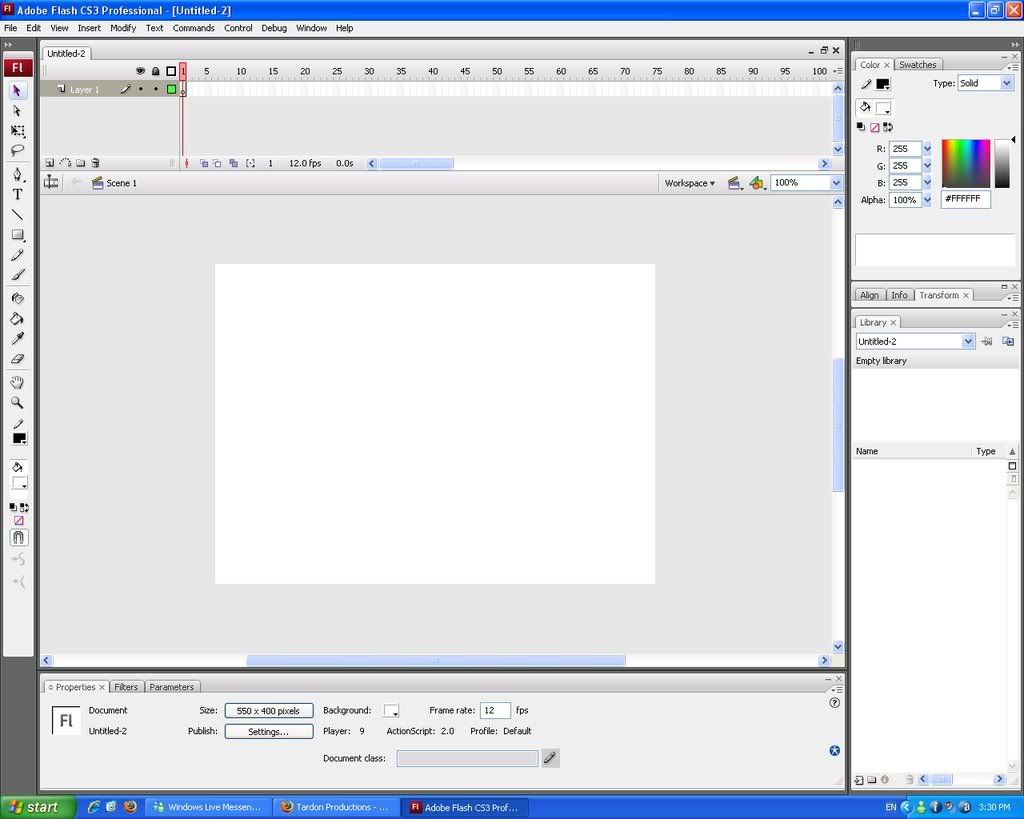 http://i169.photobucket.com/albums/u212/maholain/desktop.jpg Check the above image. Does it look at all like yours? My version is CS3, so it will be different- what you want to see at least is a blank canvas waiting for you to edit it on. Select the ‘Rectangle Tool’ now. Looking at my above image, it is the 8th icon down, just two away from the text tool. If you can’t see it, it is most likely you still have the ‘Oval Tool’- to change it, simply press the shortcut key ‘R’. You SHOULD have it now. Grab a fill colour, any you want. I chose a dark blue. To change fill colour, just edit the colour option by clicking the icon that has a bucket on top of it, with a colour below. Click that colour and choose one. Now we are going to remove the stroke colour as well. Just above the background colour object (described above), is a pencil and yet another colour box below it. Click on it and select the icon (usually located top right) that looks like a white box with a red slash across it. This prevents our object to have a border. This step is not necessary, just a little bit nicer, so don’t panic at all if you miss this step. It’s time to draw our guy. It can be any shape you want- mine is personally a squar-ish object. Hold down SHIFT if you want it to be a perfect one. If you want yours to be the same as mine, here are some stats of my object: - Colour- #0033FF
- Width- 21.9
- Height- 21.9
- X location- 152.0
- Y location- 306.0
Now select your object by clicking somewhere on it once. Now right click it, and select ‘Convert to Symbol….’. It’s shortcut key is F8. You will be presented with a screen, called Convert to Symbol. You will need to edit these following columns- Name: It can be anything you want, hero, square, etc. Type: Movie Clip. THIS IS IMPORTANT. Registration- Select the middle dot. If you are confused, refer to this image here- do not worry if you do not have the bottom half of my screen of the Convert to Symbol popup, which says linkage- that has no influence to what we are doing. 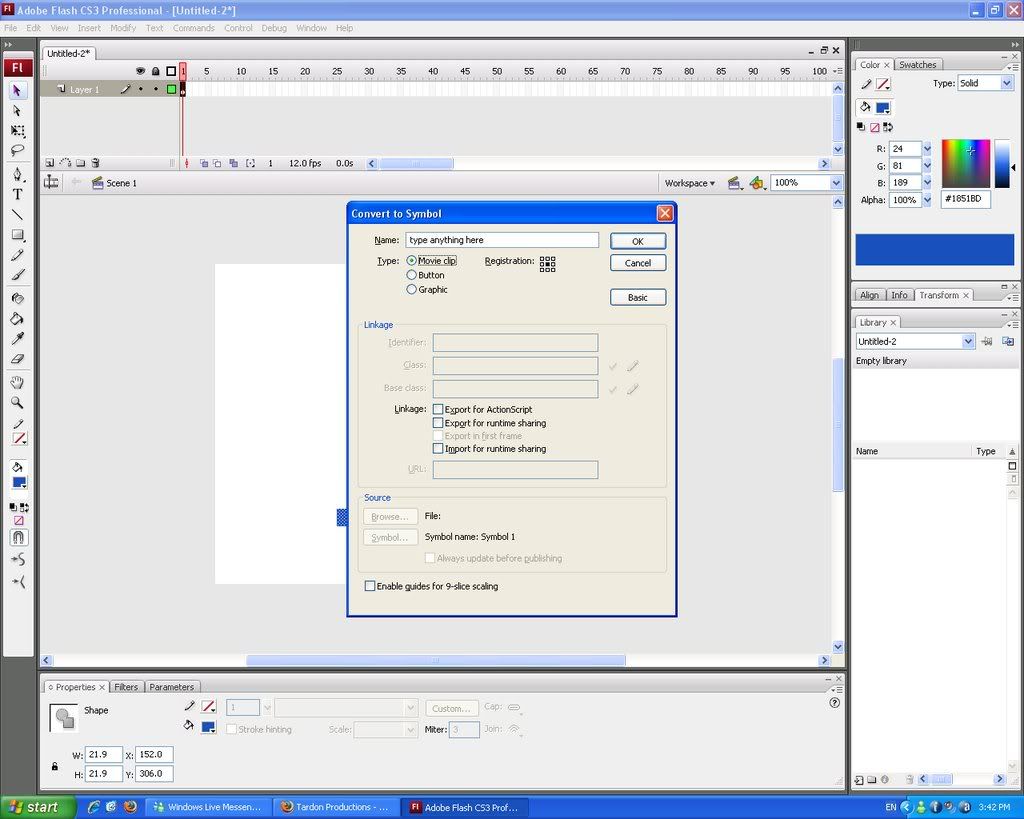 http://i169.photobucket.com/albums/u212/maholain/actions.jpg Note: If you want to use your own image, instead of drawing it, go to File>Import> Import to stage. Shortcut key of Ctrl+R. You will still have to convert it to a movie clip, etc. What we just did- converting it to a symbol- is how you are going make movie clips, etc, and was one of the skills I recommend you have on my check list (see the third option). If you test your movie (Ctrl+Enter), you’ll see your static square. If Control+Enter doesn’t work, try Control in the menu (File, Edit, etc) and then select ‘Test Movie’. Okay, okay. I know you want your guy to MOVE now. Jeez, I’ve wasted so much time! Most of you already know how to make movieclips- but here is some four directional movement. Make sure you character is selected. If you forgotten how to, click the object you just created, and it should have a little box with a crosshair surrounded by a circle on it, which is the registration point. Now press F9, or right click the object, and select actions. Add this code in, word for word, with the spaces, etc- onClipEvent(enterFrame){ if(Key.isDown(Key.RIGHT)){ this._x += 5; } if(Key.isDown(Key.LEFT)){ this._x -= 5; } if(Key.isDown(Key.UP)){ this._y -= 5; } if(Key.isDown(Key.DOWN)){ this._y += 5; } } You can exit the box now. Test your move again. Control+Enter or Control>Test Movie. Use the arrow keys to move. You should be able to go in all directions. Here is a screenshot for you: 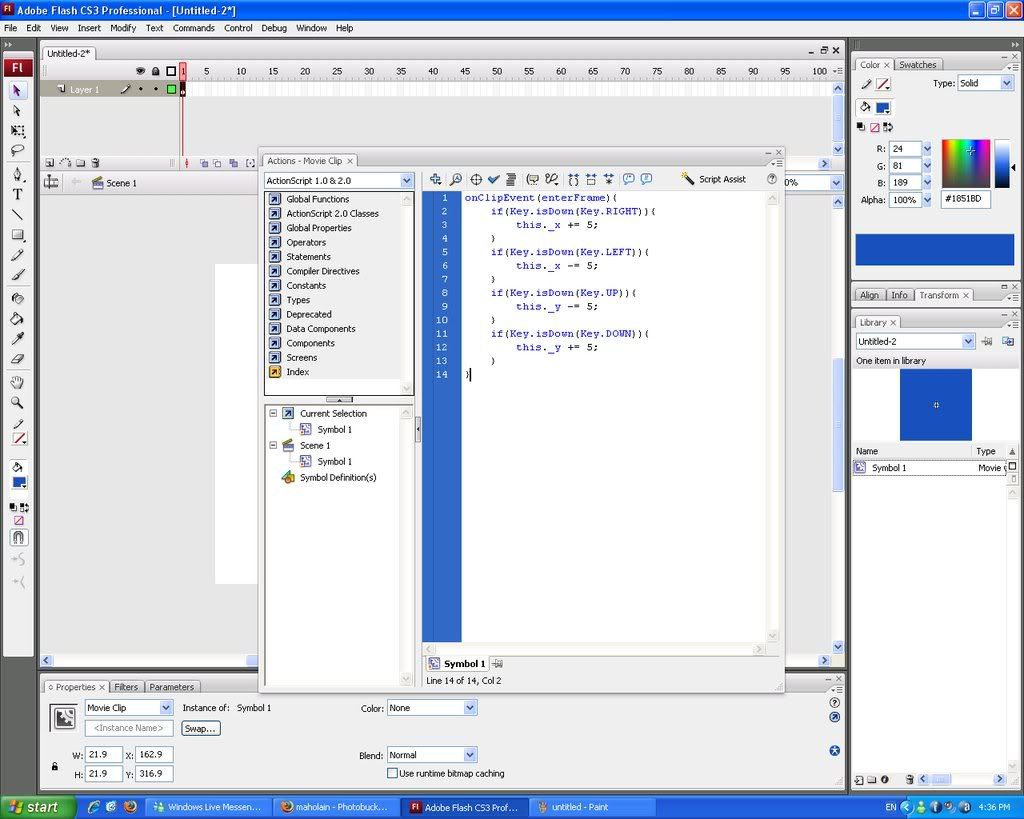 Okay, you can play around with your creation now. Like it? Probably not. It’s too simple. Let’s continue on. Right now, you can add animation, etc- but I recommend not to yet. If you know how, go ahead. But it isn’t very important at all. Let’s make ‘walls’ for out object so he can’t go off the screen. You can also use this technique as real walls, so it’s a maze. Draw an object, using the rectangle tool, shortcut ‘R’. Make it thin, and position them just along the edge of your stage (the white part). Add it on all sides, so it makes a block of your screen. In this example, I just a stroke colour of black so you can see where the blocks are located. The menu I popped out and the area beside the alpha option is how to turn stroke on or off. On the other hand, this is the pencil colour menu as well. Okay, you can play around with your creation now. Like it? Probably not. It’s too simple. Let’s continue on. Right now, you can add animation, etc- but I recommend not to yet. If you know how, go ahead. But it isn’t very important at all. Let’s make ‘walls’ for out object so he can’t go off the screen. You can also use this technique as real walls, so it’s a maze. Draw an object, using the rectangle tool, shortcut ‘R’. Make it thin, and position them just along the edge of your stage (the white part). Add it on all sides, so it makes a block of your screen. In this example, I just a stroke colour of black so you can see where the blocks are located. The menu I popped out and the area beside the alpha option is how to turn stroke on or off. On the other hand, this is the pencil colour menu as well. 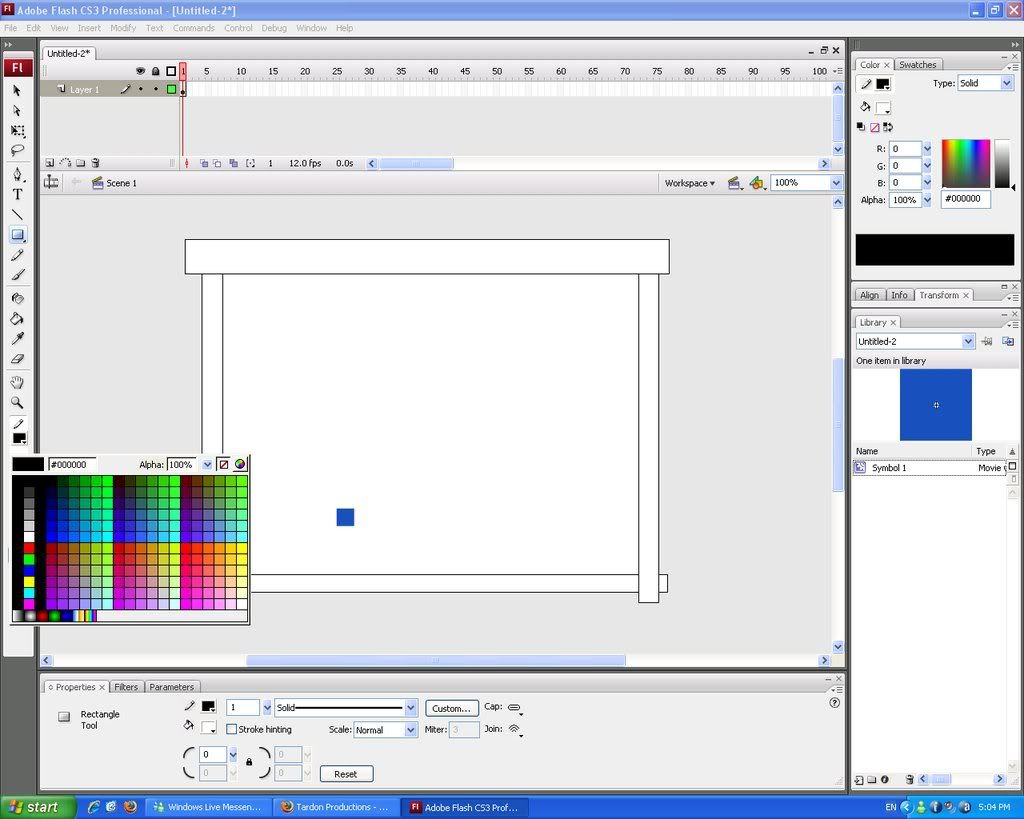 If you test your movie now, the blocks will basically not do anything. How are you going to fix it? First, exit your movie preview if you are, then click on the right block. Right, for those who don’t know is this way —>. Select it, and it only, then F8, or right click>convert to symbol… and select movie clip again, registration point middle as well. Name it anything, but try to make it so you know what it is, such as ‘wall_right’. Now do this for the left <— one, as well as the top and bottom columns you made. In total, you should have four seperate walls, columns, whatever. To make these walls work, you’ll first need instance names. Select your square movieclip, which should be the one that can move in all directions. Now look toward the bottom. See the empty box below ‘Movie Clip’? If you haven’t editted it, it should say <Instance Name>.Click on this, then add ‘man’. If you test your movie now, the blocks will basically not do anything. How are you going to fix it? First, exit your movie preview if you are, then click on the right block. Right, for those who don’t know is this way —>. Select it, and it only, then F8, or right click>convert to symbol… and select movie clip again, registration point middle as well. Name it anything, but try to make it so you know what it is, such as ‘wall_right’. Now do this for the left <— one, as well as the top and bottom columns you made. In total, you should have four seperate walls, columns, whatever. To make these walls work, you’ll first need instance names. Select your square movieclip, which should be the one that can move in all directions. Now look toward the bottom. See the empty box below ‘Movie Clip’? If you haven’t editted it, it should say <Instance Name>.Click on this, then add ‘man’. 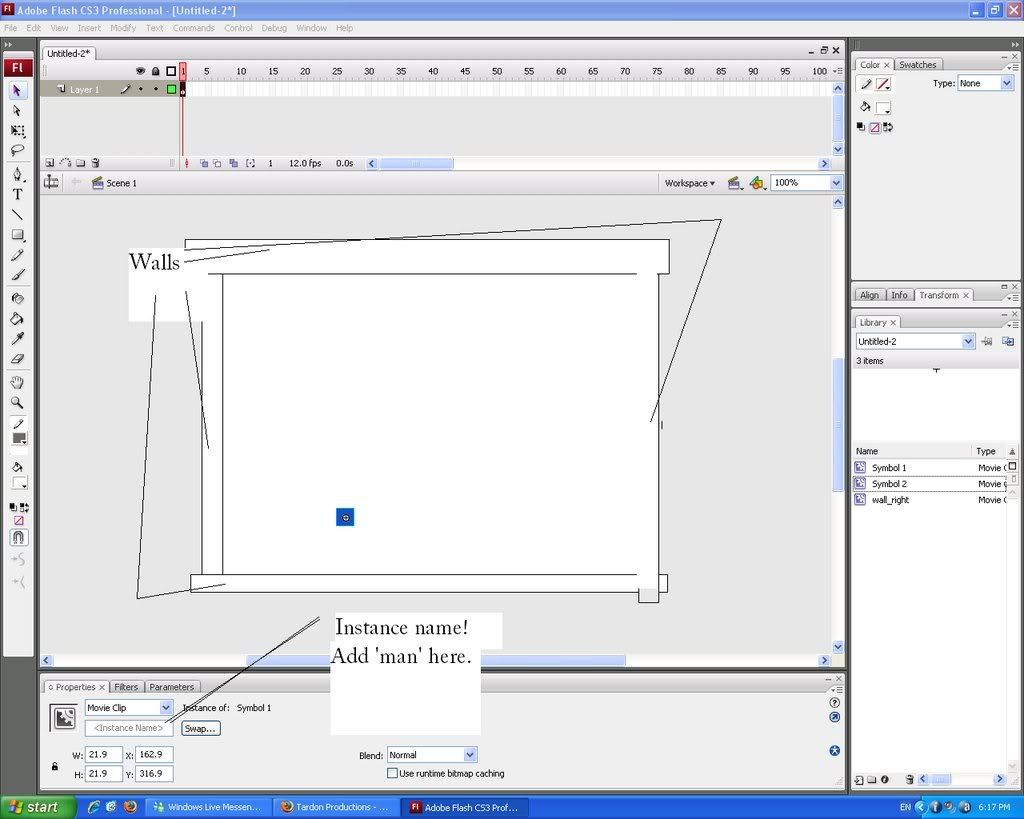 http://i169.photobucket.com/albums/u212/maholain/untitled.jpg Great! Now click on your right wall, and press F9, on right click>actions. Enter in this code- http://i169.photobucket.com/albums/u212/maholain/untitled.jpg Great! Now click on your right wall, and press F9, on right click>actions. Enter in this code- onClipEvent(enterFrame){ if(this.hitTest(_root.man)){ _root.man._x -= 5; } } So we are introduced to hit Tests. Basically, here is the script explaination- onClipEvent(enterFrame){——- This makes the computer ‘watch’ these events after ‘{’ continously if(this.hitTest(_root.man)){—– Computer checks ‘if’ a hit Test is made with ‘man’. That is why we needed a instance name. _root.man._x -= 5;————– So if’ there is a hitTest (basically, a hitTest is if they are touching each other), then man will move on the x scale - 5, aka, oppisite direction, so he will not move at all. The counter each other to equal 0. The ‘}’ just close the statement. With this code, you should be able to do it to every wall- when you look at the character’s action, say UP, you see ‘this._y -= 5;’. So on your top wall, you’d add the ‘onClipEvent(enterFrame){ if(this.hitTest(_root.man)){’ but instead of ‘ onClipEvent(enterFrame){ if(this.hitTest(_root.man)){ _root.man._x -= 5; } } You;d change ‘_root.man._x -= 5;’ to ‘_root.man._y += 5′, since it is the oppisite of up. Note the change of both the X/Y axis, and the ‘+’ and ‘-’ signs. Yup, math! Okay, if that doesn’t work, just add these codes- they are presented in this order- UP, LEFT, and then DOWN. Add these in the respective border, column, whatever. onClipEvent(enterFrame){ if(this.hitTest(_root.man)){ _root.man._y += 5; } } onClipEvent(enterFrame){ if(this.hitTest(_root.man)){ _root.man._x += 5; } } onClipEvent(enterFrame){ if(this.hitTest(_root.man)){ _root.man._y -= 5; } } Mkay! Test your movie now! You may notice that you guy seems to go ‘under’ the column, even though he can’t pass it. He may seem like he bounces back as well. All you have to do is right click your ‘man’ or square movie clip, then go to arrange>bring to front. It should solve the problem. Depending on when you do it, it might be safe to bring it to the front more than once. This should be the end result- Click on it to focus it so you can move. Since it is a little small, refer to the actual size here- http://www.instantimagehosting.com/storage/Untitled-2_1.swf If you got this far, congratulations! It must mean my tutorials are okay! Or you are really smart ;). I’d choose the latter, but oh well. Good job once again! Now it’s time to touch up some things- maybe add lines or some kind of indicator where the walls are. Put some colour or design in it. Anything can spice it up. Like before, add any creative touches you want. Done? Good! Okay, you can probably get most of that in many tutorials. Here’s a less known one- getting items. We will explore this in the easiest method first- getting money that will add to a dynamic text box. First, let’s find a way to get money that will add to a counter- a dynamic text box- as we touch it. Then, the movie clip (money) will be removed, so we can’t get it again. Go to the timeline, with your frames and layers. Select frame 1, which you should be working on, and right click it and select actions. F9 works as well. You’ll enter to a familiar box where you can input code- but check to make sure you are on Frame 1. Refer to the image below. 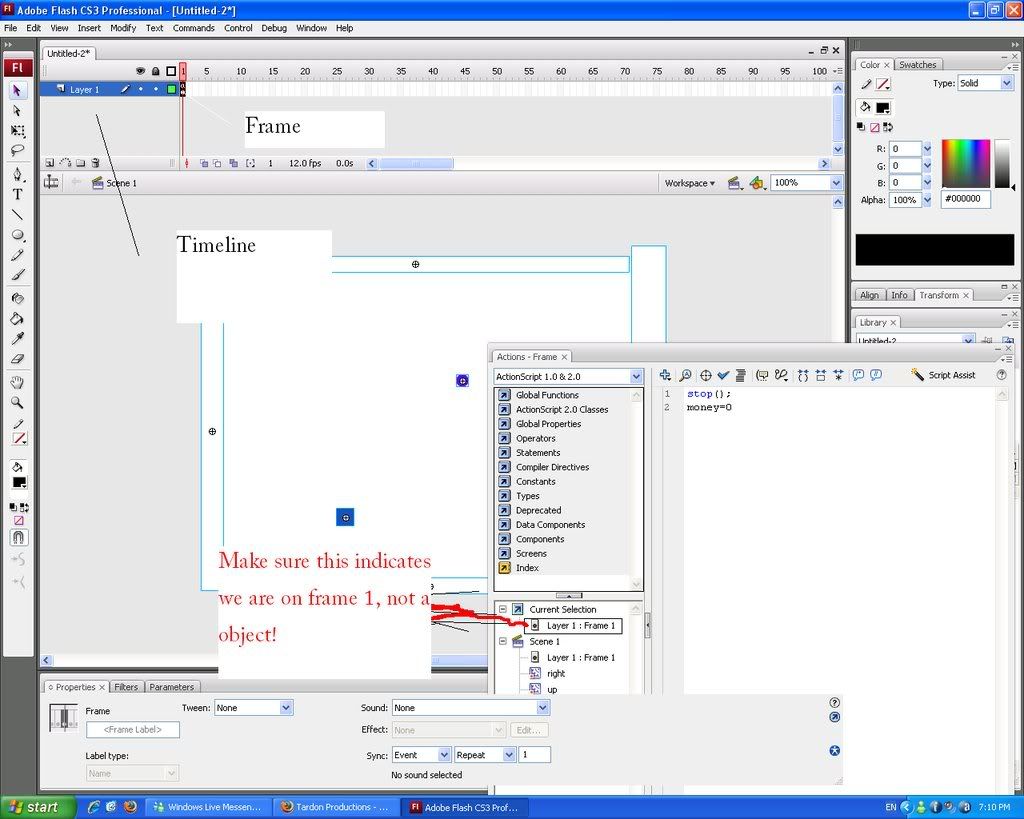 http://i169.photobucket.com/albums/u212/maholain/1.jpg Done? Great. Now add this code to the Frame 1: http://i169.photobucket.com/albums/u212/maholain/1.jpg Done? Great. Now add this code to the Frame 1: stop(); //the frame will not move along the avaliable frames unless a command tells it to money=0 // We will create a text box with a variable called money later. This tells the computer that this textbox should default display the digits ‘0′ Don’t be afraid to copy and paste the whole thing- you may notice that the text after ‘//’ is not code. But in ActionScript, the ‘//’ symbol can allow someone to add comments. In this case, I am describing the script. Now, let’s create a dynamic text box. Select the text tool, which should have some kind of ‘T’ on it. Shortcut key: ‘T’. Drag and release to create a text box; but it won’t be dynamic unless you make it. In the ‘properties’ window, when you select your text box, it will have a drop down box that may say ’static text’ right now. Change it to ‘Dynamic Text’. There, you made dynamic text. Now, in the same properties window, there should be an empty box waiting for input called ‘Var:’. No, this isn’t the instance name spot! Once you find it, add ‘money’ without the ‘ and ‘. If you play your movie now, your text box should be displaying 0. It won’t change as nothing is making it to, but that will be solved soon. Refer to this image below if you can’t find the var, properties, etc place: 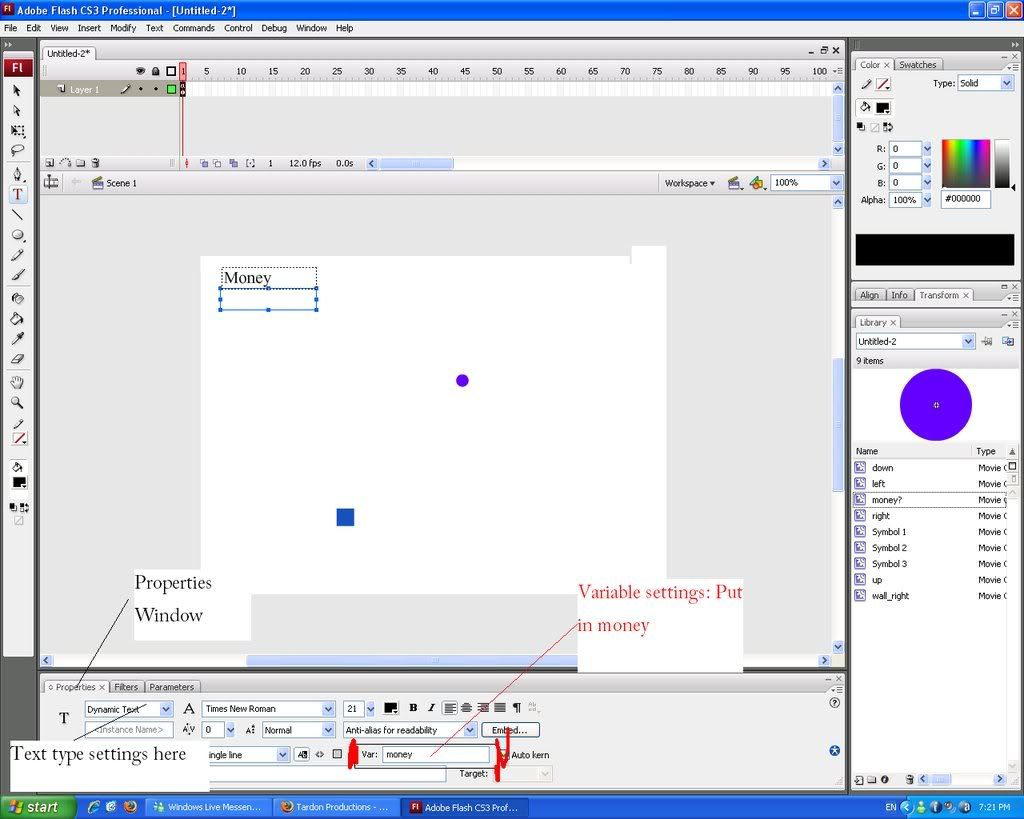 http://i169.photobucket.com/albums/u212/maholain/2.jpg If you look at the above image, I also added a static text box with the words ‘Money’ above my dynamic one. Totally optional. Good for letting people know however. Don’t panic if you don’t have that purple dot on the screen. I added it there ahead of time, to experiment. But now it’s your turn- select the oval tool, which is hidden with the rectangle tool (press and hold the rectangle icon in the tool bar to bring out all the options of the shapes) or press ‘o’ on your keyboard. I’m going to tell you now, if you ever see this ‘)’ when I tell you to press a shortcut key, it’s usually either zero or ‘o’. That letter. That makes the ‘ohhhhhhhhhhhhhhhhhhhhhh’ sound? Yep. Draw a little circle, like a coin. Decorate it if you want. You can add a stroke as well. Make it unique, unlike my purple circle *cries*. But purple’s cool, me right? Thumbs up! Wow, so much for off topic. Probably been typing for too long. You know the drill now. Select the object, and turn it into a symbol. You forget how? Oh noes! Press F8, or right click> conver to symbol… Oh darn, I’m too lazy to press SHIFT for capitals now! Mkay… since you should know how to add instance names now, like you did and added one to our square to make it ‘man’… Do the same thing but add ‘money1′ instead of man to that purple circle I have. Open up the actions window (Let’s not explain again, just Ctrl+F on this piece of writing too find an explaination…) and add… http://i169.photobucket.com/albums/u212/maholain/2.jpg If you look at the above image, I also added a static text box with the words ‘Money’ above my dynamic one. Totally optional. Good for letting people know however. Don’t panic if you don’t have that purple dot on the screen. I added it there ahead of time, to experiment. But now it’s your turn- select the oval tool, which is hidden with the rectangle tool (press and hold the rectangle icon in the tool bar to bring out all the options of the shapes) or press ‘o’ on your keyboard. I’m going to tell you now, if you ever see this ‘)’ when I tell you to press a shortcut key, it’s usually either zero or ‘o’. That letter. That makes the ‘ohhhhhhhhhhhhhhhhhhhhhh’ sound? Yep. Draw a little circle, like a coin. Decorate it if you want. You can add a stroke as well. Make it unique, unlike my purple circle *cries*. But purple’s cool, me right? Thumbs up! Wow, so much for off topic. Probably been typing for too long. You know the drill now. Select the object, and turn it into a symbol. You forget how? Oh noes! Press F8, or right click> conver to symbol… Oh darn, I’m too lazy to press SHIFT for capitals now! Mkay… since you should know how to add instance names now, like you did and added one to our square to make it ‘man’… Do the same thing but add ‘money1′ instead of man to that purple circle I have. Open up the actions window (Let’s not explain again, just Ctrl+F on this piece of writing too find an explaination…) and add… onClipEvent (enterFrame) {//already explained, tells the computer to constanly check for actions on this object… if (this.hitTest(_root.man)) {//explained as well, checks ‘if’ there is a hitTest with man, our square _root.money += 100;//remember how you added a similar code to our frame 1? This increases the digits from 0 to 100. Clever, huh? }// ends a statement if (hitTest(_root.man) == true) {//checks for a hitTest with man again, and if it is true… unloadMovie(_root.money1);//removes the movie clip with an instance name of money1, which should be the one we add this code to }//statement end }//statement end again Now test your movie! Control+Enter, or Control>Test Movie if your forget. When you move over ‘money1′, the circle’s instance name, it should add to your dynamic text box with the variable of ‘money’ from the default 0 to 100! If you don’t want people to get that, or get less, just change the 100 in ‘root.money += 100;’ in the above code to whatever, like 1, or 1000000000000000000000000000. Just had to take up some room! =] Wow, it’s actually looking like a game. A-mai-zing. Let’s move on. As promised, we’ll also cover the part where you can talk to NPC’s if you are close enough to them! It isn’t very hard actually… Create another movieclip, and this will be your NPC that you can talk to. I hope you know how to create one now! This part will get a little confusing, so I will provide a check list later of the things you should have. Make another MC now, let’s say that it should COVER (yes, cover) the entire NPC that you just made, plus more. Don’t worry, I know it looks bad for now. After you converted this to a Movie Clip, go to the properties window, and at colour, which should say ‘none’ for now, and change it to Alpha. Beside it, a new drop box will pop up. It might be set to 100%- change it to 0%. Now you can’t see that ugly box you made. Wee! CHECK LIST TIME! You should have: - A NPC
- A invisible box, with alpha setting at 0%, right ONTOP of the NPC
Double click the NPC now: You might have to move the invisible box away first to get to him. Then select the NPC and double click it to get into it’s settings. It has it’s own timeline too- go to frame 2 (the one right after frame 1) and right click it and select ‘Insert Keyframe’. Not insert Frame, okay? A copy of Frame one will be now made, and now add some text of what your NPC wants to say when you go close to it. Maybe, ‘Hello’? Or something. Be creative. Add speech bubbles, etc, right on frame 2. Add ’stop();’ commands to both frames, by right-clicking the frames while inside the character layer, and select ‘Actions’. Now double click anywhere else than the guy to return to the main place in the timeline. Re-position that invisible box over the NPC. EDIT: *Special Thanks to Louie for pointing this HUGE MISTAKE out!!! Thanks!* Okay, so now for some actionscript. First, make sure your NPC (NOT THE INVISIBLE ONE) has an instance name of ‘npc’. Then, on the invisible box, put in this script: onClipEvent(enterFrame){ if(_root.man.hitTest(this)){ _root.npc.gotoAndStop(2); }else{ _root.npc.gotoAndStop(1); } } I know some of it is not necessary, but I have no time to trim it right now (This is part of a game I was working on). (I’ve updated the script, so the crossed out does not apply anymore!) Does it work now? Make sure your ‘npc’ has two frames with ’stop();’ commands on both. Then, make sure your invisible box has the above code. Your player must have an instance name of man. Test your movie. It should work! If it doesn’t, check to make sure the NPC has an instance name of ‘npc’: remember, it’s case-sensitive. It can’t be ‘NPC’. Or ‘NpC’. Or whatever, techno, geeky style you got. Just kidding. Do you have something like this now? http://www.instantimagehosting.com/storage/Untitled-2_2.swf Remeber, click somewhere in the Flash movie to focus it to move! That weird stick-block figure is my NPC, not my main character =]. Great! We’ve gotten a lot done. Reward yourself with ice cream or something. You are going to learn even more soon… This is the part you’ve ALWAYS been waiting for most likely. It is generally the hardest part to find in any tutorial. This time, we are going to study HP bars. Follow these instructions closely please! It isn’t too hard, but one mistake and it will totally fail. Like making your character and a NPC, make an enemy. Then, turn it into a movie clip like we’ve done so long. For a simple recap of stats, make sure the type is Movie Clip, and the registration should be set to the centre. Give this enemy an instance name of enemy. Scroll up for a recap on how to do so if you forget! Add this code into the actions panel of ‘enemy’ onClipEvent(enterFrame){//explained, look at examples before{ if(this.hitTest(_root.man))//explained, look at examples before{ _root.hpBar -= (random(2)+1);//the text box of ‘hp’ which we are going to make will be subtracted randomly, anywhere from 0-2, and an extra 1, so max damage is 1, but minimally, at least 1. } Now create another dynamic text box. I’m not going to drill again and again on these processes; just remember the handy Control+F function. Give it a variable of hpBar. Remeber to include the capitals! Then, create your actual Hp bar. A red rectangle works fine. Surprise, surprise, convert it to a movie clip again. MAKE SURE THE REGISTRATION POINT IS IN THE CENTER LEFT. Like: - - - *- - - - - The star represents the place where the registration point should me in the 3×3 registration grid. (Credits to Nicau for point this out!) Give it an instance name of ‘hpgauge’. Remember how we added code into Frame 1 for our dynamic text box for money? We will do the same for the hpBar text box as well. _root.hpBar = 100; This basically sets our base text as 100. Change it if you like. Make sure that this code is entered in FRAME ONE, not the text box with var: hpBar; or the red hp bar for that matter. Now enter this code in your red hp bar: onClipEvent(enterFrame){ this._xscale = _root.hpBar; if(_root.hpBar < 0){ _root.hpBar = 0; _root.gotoAndPlay(2) } } The code is a little more complex here, but it isn’t too hard. Basically, it makes the computer shrink the HP bar according to the percent HP you have left. Test your movie now? Is it working? You might have to right click your character again and select arrange>bring to front so your enemy won’t overlap your character. Now let’s make a lose screen. On the main timeline, create a frame by right clicking frame 2, and this time, select ‘Insert Blank Keyframe’. This will lead you to a blank screen where you can draw you lose, you suck!, or whatever. Make sure you go into Frame 2’s actions- right click Frame 2>actions, and put in stop(); This won’t make the movie play over this unless needed. Once your HP hits 0, you should go to frame 2, since we already inputted the code. Didn’t notice? Here: onClipEvent(enterFrame){ this._xscale = _root.hpBar; if(_root.hpBar < 0){ _root.hpBar = 0; _root.gotoAndPlay(2)// this makes it go to frame 2. The number 2 in this statement, (2), is the frame number. } } Test it again. It should work, right? Here is another example: I know it is very fast paced, because I set the frame rate at 120 fps. I’ll teach you that another time. You probably already know though- it is excellent when testing games and not wanting to waste time waiting to die. Bad for players though. And sorry for the lose screen- had some fun with the language there *cough*. You must refresh the page to try again, because there is no back btton yet. Or you could right click my flash movie and select ‘rewind’. Works like a charm. Wow… we covered many things. Checklist again: - Making objects
- Converting them into Movie Clips
- Adding actions
- Creating walls with help of hitTests
- NPC interactiveness
- Money pickup
- Dynamic text box lesson
- Hp bar
- Enemies
Yeah… good job guys! Or girls! I’m not racist here, I love both! Especially the latter though. You know why. =] I covered everything I told you we’d do: what now? First of all, look at all those fabulous tutorials out there on how to animate; they won’t be covered until maybe later. But as a bonus, let’s learn how how to create a timer AND a custom cursor! As well as a back button of course! The timer is almost the same as any other dynamic text box. Create one, and in the var: box, enter ‘clock’. Now draw ANYTHING you want, a line, etc, and move it off the stage (the white area) so you can’t see it. Convert this into a movie clip, but don’t give it an instance name or anything. Double click to get in it. Now, check what fps you are at. The default in Flash CS3 is 12- it should say in your properties box. You might have to return to the main timeline (double click somewhere other than the object to go out) and check. When you are sure, create a frame in side the ‘clock’ movie clip- if your frame rate is 12, create a frame at 12. Just right click>insert frame. If your frame rate is at 120, at a frame at 120. Since the frames play 12 times lets say if your fps is 12, then this is an accurate measurement of seconds. Then, add this script to whatever frame you fps tells you (like 12): _root.clock+=1; Then, return to the main timeline (double-click anywhere else to go back) and right click Frame 1, and selecting actions. Now, on frame 1, add in this code: clock= 0 And it should work. If your clock starts AT number one, change it so it looks like: clock=-1 Use negative signs people! Great. You can do a lot with your knowledge here for sure, if you take it with you wisely. If you want, copy the dynamic text box with the var: of clock (Right Click>Copy, or Control+C), and go to frame 2, your lose screen. Paste in your text box anywhere. When you go to this lose screen, it will show how long you have played. Might want to add with a static text box the words ‘Time’ as well, so players are informed. Custom cursor is a snap to make. It basically masks over your current cursor and follows it. Draw a cursor, but don’t make it too big- try to make the edge sharp like you would see with a standard cursor. Convert this to a movie clip as well, but CAUTION: The registration point of the cursor MUST be set to the very top left. So it would be the top dot on the last column to the left. It must be for it to function as a real cursor. Now, open the actions screen for the cursor movie clip. Add this code: onClipEvent(enterFrame){//computer checks frames for differences Mouse.hide();//hides Mouse startDrag(this,true);//starts the drag of this item }//end script There we go! Now my final promise was a back button. Add one to your lose screen. Create some sort of button, a rectangle, etc, and convert it to a symbol as well (F8).. but for type, select Button. Change the registration point back to the middle. Open the actions menu for this (F9), just as you would for a movie clip. Add in this code: on(release){// when the mouse is released gotoAndPlay(1)// go to and play frame 1 }// end script Oh yeah, make sure you copy the cursor you made on frame 1 to frame 2, or else you won’t have it! And, right click the cursor item, select Arrange>Bring to Front. Or else the button will completely hide it. If you want make your button a little bit more entertaining and visually inspiring, view other tutorials on buttons… or wait for mine! =] If it ever comes of course. I’m a bit tired after this one. This concludes my tutorial! I hope you have learned a lot from it- and that you can use these simple codes and turn them into more advance things. Ideas include: - Making a portal that directs you to a win screen if you touch it
- An instructions screen, using frame and button knowledge
- And much more!
As you can see, a lot is possible! Please stay tuned for more awesome tutorials, and I will build and improve them and make them a lot easier to understand in the future. If you have something you don’t understand, contact me right away! Not only do you help yourself, you help others in a similar situtation. Email me at finaiized@gmail.com, or add me on MSN at blanked@live.com ‘Til next time, Dominic This entry was posted on Monday, May 5th, 2008 at 3:44 pm and is filed under Tutorials. You can follow any responses to this entry through the RSS 2.0 feed. This entry was re-posted as a tribute on April 12, 2009, by BlankedT from Tagify You can leave a response, or trackback from your own site.
Read more...
Flash CS3 tutorial- RPG, ActionScript 2, Talkable NPC, Health, Movement, Pickup
|

 Tagify is a blog focusing on all aspects of the internet. You`ll find tutorials here on Adobe Flash and Blogging, tips, tricks, and design news. It`s the only site that reworks the web.

